The Problem
If you work on the command line, chances are you hate filenames with spaces in them; don’t even get me started on awkward punctuation and inconsistent capitalization!
A file like: My Important Document - Final Version (2).pdf
... means I’m either going to have to quote it: vi 'My Important Document - Final Version (2).pdf'
... or, even more horribly, escape it: vi My\ Important\ Document\ \-\ Final\ Version\ \(2\).pdf
If you are writing a Bash script, then you have to think about…
Word splitting because you forgot to quote
$file, which can unintentionally split a filename into multiple arguments.Unexpected globbing can lead you astray because
*,?, and[…]mean something very different to the shell than they do to the user writing them in a filename.Did you know that Unix thinks newlines are perfectly acceptable in a filename, even though I can’t think of one single use case in which you would want this!?!
All these and more make your scripts increasingly likely to fall over unexpectedly, and this could all be avoided if filenames were just house-trained better.
Given this typographical hellscape, who are the villains committing these sins of syntax? Well, it isn’t me! this_is_my_file_csw_v1.adoc is about as adventurous as I get. It’s You’re unsubscribed..eml when I copy a file from an email to my file system so I can actually refer to it again when I need it, or it’s some file I’ve downloaded (Old Paper Texture.jpg) or an application has generated — Bogos Data/WORD TEMPLATES/Basic Report Template.doc.
I feel like the Kyle Reese of the command line, dodging overly verbose Terminators in a typographical wasteland.
Now, I say this knowing that I should write my bash scripts to take all of these things into consideration because decrying what I consider to be poor filename etiquette doesn’t mean that I’m not going to still encounter it.
I think it’s more that when I see it, I have to do something about it.
My Solution
I like my files in snake_case.
There are tools like rename that can do this. If your filename is Hello World.txt:
rename -n 's/ /_/; y/A-Z/a-z/' "Hello World.txt"... will get you to hello_world.txt. However, it requires a knowledge of regex, and we all know how that goes. Also, rename is the Swiss Army Knife of file renaming, and I thought it might be a little more than my needs require.
All I want are my files to be in snake_case. In my naivety, I thought Bash parameter expansion was probably all I needed, and with a child’s enthusiasm, my snake function was born.
snake() {
    local file="$1"
    local result
    result="${file// /_}" # Replace spaces with underscores
    result="${result,,}" # Convert everything to lowercase
    mv -- "$file" "$result"
    echo "Renamed '$file' to '$result'"
}
Scope Creep
snake 'My Important Document - Final Version (2).pdf'
Renamed 'My Important Document - Final Version (2).pdf' to './my_important_document_final_version_(2).pdf'
Over time, it turns out that my interpretation of snake case is a lot more nuanced than I thought. I don’t like punctuation (except when I want a directory to be name.status.date). I don’t like special characters like apostrophes or trailing spaces. I want to batch process a lot of files at once, and I want that batch process to be recursive, except when I don’t. I also don’t want it to accidentally overwrite files when I have Hello World.txt and hello_world.txt already exits in my directory.
With each new file I renamed, I found that the creativity of cyberland had found yet another way to disturb my filename namaste, and my snake function became an ouroboros.
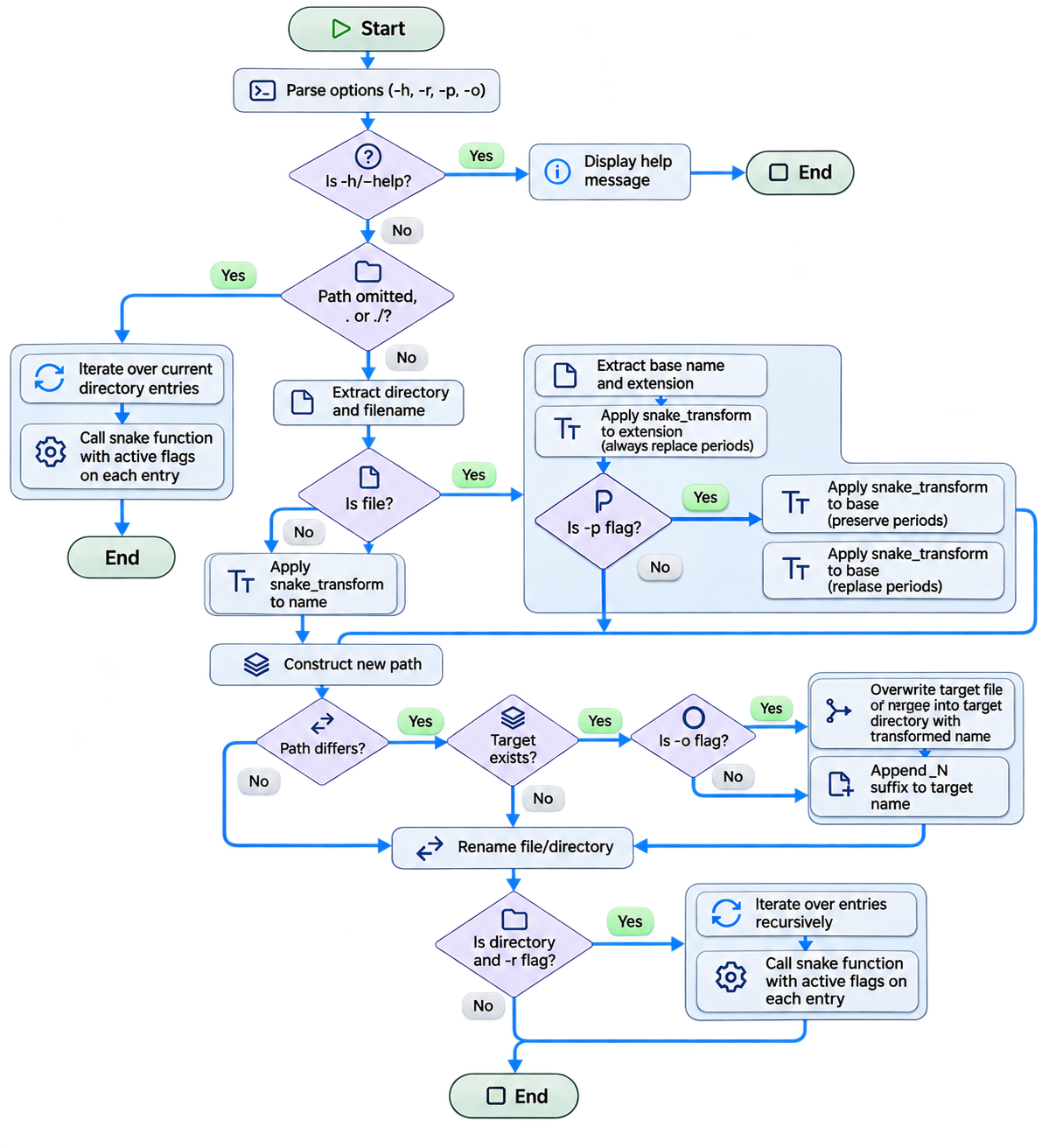
However, the brackets have gone.
snake 'My Important Document - Final Version (2).pdf'
Renamed 'My Important Document - Final Version (2).pdf' to './my_important_document_final_version_2.pdf'
As of this writing, snake has an expanded feature list that addresses most of the filename issues I’ve encountered so far. The table below highlights the key file-calming features I find most restful. No doubt the list will continue to grow as the file pixies continue to conspire against me.
| Making filenames behave | Making the function useful |
|---|---|
|
|
You can see everything that snake can currently do over on GitHub.
In Conclusion
What started as a simple exercise in snake case quickly ballooned into a complex set of requirements for nothing short of a highly opinionated filename-renaming utility with its own curated views about punctuation, extensions, recursion, and what constitutes acceptable behaviour.
How many bells are ringing here? Was this your last customer engagement, software development, sales pursuit or hasty commitment to your spouse?
How often have we heard, or indeed said, "It should be simple enough"? The trouble is that the simplicity usually exists only because we haven’t yet encountered all the exceptions, edge cases and unforeseen consequences. It’s only when you get your hands dirty that you discover the solution you naively wanted wasn’t the solution you needed.
That is why we should always understand our problem statement, clearly define our use cases, and model our target states before we begin, lest our seemingly trivial requirement become a considerably larger, more expensive, and more time-consuming undertaking than we could possibly have imagined.
All I wanted to do was get rid of some spaces.